
By using cylinders for each section of the body - arm, leg, torso..etc, I can line up the vertices in the side and front views to create a relatively exact model to my initial designs.

The model is first only half created, as it will be mirrored to create a complete image - saving you the time of modeling the other half separately, and also ensures that you are accurate when you create the other half of the model.


I have now modelled the hands, which consist of joining various shapes together by joining their vertices and then shaping them into a smoother, more natural looking shape to be fitted onto the rest of the body. The problem with fitting the hands on was that the ends of the arms were of a different shape to the ends of the hands, so the shapes of both had to be edited before the vertices could be joined. As I had already made the rest of the model, I could not just mirror the image to create a hand on the other side - I had to duplicate the image, delete the unwanted faces and delete part of the handless arm so that the mirrored duplicate of the hand could be attached. I deleted part of the arm also because of the editing of the vertices when I was attaching the arm, to both the arm and the hand. This way both arms and hands would be exactly the same.

 TOON SHADING
I chose to create a toon shaded character, because I think it is a simple way to colour characters effectively, concentrating on the shapes of the character and their shadows. There are many types of toon shading, some taking on the form of a more cartoony style with outlines, others emphasising colour
RESEARCH:
 I really like the colour scheme for this game - Madworld. Although the content is very gory, I think that the colour scheme, being similar to my characters, creates a really nice effect, where the red really stands out in comparison to the black and white backgrounds and characters. I will perhaps use a similar colour scheme to have my red character stand out and have her poses be the focus of the animation.
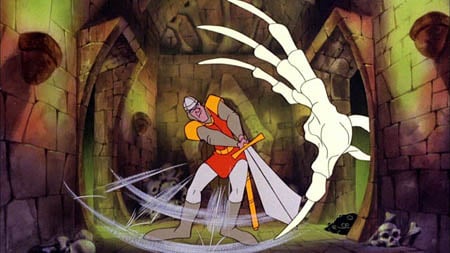 This is an interesting game called dragon's lair, which is effectively a completely tooned game. Due to the restrictions of the consoles at the time (1983), most games designers had to make do with very simple, sprite animation. This game, was instead put on laserdisk, which adversely affected the gameplay, but made it a visually beautiful toon game - and one of the first to be released.
Another World is a visually stunning cinematic platforming game, which was possibly the first of its kind to create a tooned world, and with cut scenes to such a high cinematic level. The shading in the pixels were extremely detailed, and the colours were clear and blocky. Ignoring the pixeld nature of the game, I really like the subtle colours that are built up to create a beautiful scene, expecially at such an early time in the gaming world.

This game is called Fear Effect, which is a really nicely and simply toon shaded game. The colours have nice subtle shadows on them that really bring the characters even more so into a 3D world.
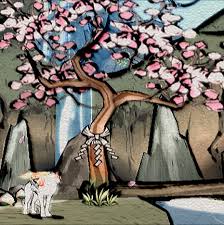 This game is called Okami, and has a very interesting art style - everything looks like a Japanese watercolour painting due to the thick, varied outlines and soft pastel colour scheme. It is very beautiful, but I think something like this would be too distracting for my animation.
 Paper Mario - This style is very cartoony - a bit too cartoony for the style i'm looking for, but I really like the defined colours, and the outlines make everything look completely 2D in a 3D environment, which I think is a really interesting style.
Ilove the colouring for this game. The toon shaded red shadows look particularly effective and work really nicely with the light. - Killer 7

This game - Zelda Windwaker, in particular has the kind of toon shading that I want to represent in my character. The colours are bold and clearly separated, which allows the colouring to emphasise the shape and the posing of the character.
TESTS


White arms test - I have rendered my character with her white arms as previously designed, but I think that in Maya these look a bit strange, and seem to be too big for the body. I have therefore changed her arms so they are just red, which seems to be a better balance for the character.

In the render below I have been playing around more with shadow on the toon shaded effects, and I have found that by adding black to the colours added to the toon shader, I can create some really nice shadow effects over the body of my character, which really emphasises the shape and pose that she is in - it gives more depth to the image. This final test of the toon shading has simple blocky colours, just like the Zelda Windwaker graphics, which creates a simple, yet defined colouring scheme for my character.

RIGGING
I have attempted to Rig my model, but it has proved to be very difficult. I started off by creating a skeleton for the model to move with. By creating an extra joint in the wrist, I can have better control over the hand movements. Also, with an extra joint in the hood I can animate that as the character moves also.
 A test pose after a soft Bind:
Screenshots of how I was rigging the skeleton of my character, including controllers so that she would move properly.


This is a test after rigging my character. Unfortnatelly, it really hasn't turned out well, and distorts horribly... I really can't work out why. The hood distorts when you rotate the arms, the crotch area's polygons turn into weird angular shapes and the right arm just seems to be constantly extended. I have decided to attempt Paint Weighting, which was suggested to me after I showed some friends my rig.
PAINT WEIGHTING
Paint weighting is where you paint specific areas of the model to control how each part of the model is distorted as you move the rig. This helps create better muscle structures, and stops strange polygon shapes appearing as you try to animate a model.


This is a test after trying to fix my model with paint weighting. The hood distortion is a little better, but I cannot work out the problem with the arm. Unfortunately, due to time constraints, and how much I have been struggling to rig this model, I will have to rely on a downloaded rig that I have used for testing to create my final animation.

This is interesting. I was wondering, which cel-shading style were you going to use? I'm trying to get a style sort of like Mad World. Either way, you should definitely soften some of those edges on your mesh. Cel-shading, most styles for that matter, need to have a nice, smooth-looking geometry.
ReplyDelete